JetMenu 3.0.1 – WordPress Plugin for Creating Custom Mega Menu
Your website’s navigation is more than a list of links — it’s the roadmap that guides every visitor from their first click to the information or product they’re looking for. A smartly structured menu makes navigation effortless, keeps people exploring, and quietly encourages them to take action. And when it comes to building stunning, content-rich, fully responsive navigation menus in WordPress, JetMenu 3.0.1 by Crocoblock is in a class of its own.
Whether you’re building an eCommerce store, a news portal, a corporate website, or a creative agency site, JetMenu gives you the tools to craft navigation that’s not only functional but visually striking, deeply customizable, and perfectly responsive — without writing a single line of code.
In this comprehensive review, we’ll cover everything JetMenu offers: features, builder compatibility, WooCommerce integration, design options, mobile responsiveness, pricing, and more.
What Is JetMenu?
JetMenu is an advanced mega menu builder for WordPress that works perfectly for different site types. It’s part of the JetPlugins toolkit by Crocoblock and helps you create modern, fully responsive mega menus.
JetMenu is and remains first and foremost an Elementor menu plugin. Elementor users appreciate its full compatibility, which allows them to build menu layouts in the visual editor. JetMenu offers two widgets to output a menu on the page — Vertical Mega Menu and Mega Menu — abiding by the drag-and-drop principle.
But JetMenu isn’t just for Elementor anymore. Recent versions have significantly improved Gutenberg support. You can now add and style menu blocks directly in the native WordPress Block Editor, adjust spacing, icons, and animations inside the familiar WordPress interface without extra add-ons.
On Trustpilot, JetMenu maintains a rating of at least 4.6/5 ⭐️ and reviews consistently mention the high quality of the support services.
Who Is JetMenu Best For?
JetMenu excels across a wide range of website types:
| Website Type | How JetMenu Helps |
|---|---|
| eCommerce / WooCommerce Stores | Display product categories, featured items, sale badges, and price info in the menu |
| News & Magazine Sites | Show recent blog posts, categories, and author info inside mega dropdowns |
| Corporate & Business Sites | Organize large site structures into clean, multi-column navigation panels |
| Creative Agencies | Build visually rich menus with multimedia content and custom templates |
| Blogs & Portfolios | Use dynamic content to keep navigation fresh and relevant automatically |
| Freelancers & Developers | Save and reuse menu presets across multiple client projects |
Key Features of JetMenu 3.0.1
1. Drag-and-Drop Mega Menu Builder
Use Elementor or Gutenberg to design and organize your menus visually. JetMenu lets you insert dynamic content blocks: images, videos, blog posts, WooCommerce products, contact forms, and more.
You can drag and drop any Elementor widget or Gutenberg block directly into your menu panels — the same way you build regular pages. This means your mega menus can contain virtually anything: contact forms, product carousels, image galleries, blog post grids, social feeds, or even embedded videos.
2. Full Elementor & Gutenberg Compatibility
What sets JetMenu apart is how naturally it fits into different WordPress workflows. It works seamlessly with both Elementor and the Block Editor (Gutenberg), so whether you design pages with a page builder or stick to core WordPress blocks, you can create and edit menus in the same environment. The plugin’s interface reflects the editors you already use, making the menu feel like an extension of your site design process rather than a separate tool.
3. Multiple Menu Layout Options
JetMenu supports three distinct menu layouts to match any design requirement:
- Horizontal Menu — the classic top navigation bar with dropdown mega panels
- Vertical Menu — a sidebar-style navigation ideal for left/right-panel designs
- Hamburger Menu — a fully custom mobile-optimized slide-out, push, or dropdown style
You can create horizontal, vertical, or hamburger menus with custom behavior for desktop, tablet, and mobile.
4. Rich Content Mega Menus
The JetMenu mega menu is more than a dropdown. It’s a full content panel where you can place product categories, banners, images, blog posts, forms, and even custom templates.
The types of content you can embed inside a JetMenu mega panel include:
- Stores — Product categories, featured items at a discount, clearance banners, and WooCommerce product grids
- Multimedia — Videos, audio, portfolios in grid, masonry, or equal-height layouts
- Contacts — Contact details, social links, Google Maps, and embedded contact forms
- Blog — Latest posts sorted by author, date, tags, or categories using Smart Posts List, Smart Posts Tiles, and more
5. Deep WooCommerce Integration
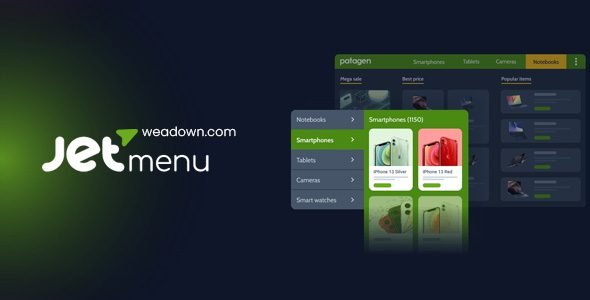
JetMenu is extremely plugin-friendly. It’s perfect for eCommerce and supports the WooCommerce plugin, making it possible to create attention-worthy website menus. You can handily fit any product-related data into the menu container, including images, prices, sale badges, and more.
JetMenu’s WooCommerce compatibility lets you add product cards, categories, sale badges, and other eCommerce elements directly into your menu for faster shopping navigation.
For online stores, this is a game-changer. Visitors can browse your top product categories, see featured or discounted items, and navigate directly to product pages — all from a single dropdown panel without leaving the homepage.
6. Advanced Design & Style Customization
Adjust typography, colors, icons, paddings, spacing, hover states, and animations for top-level and submenu items directly from the JetMenu Dashboard.
Granular visual controls include:
- Dropdown effects and enter/exit animations
- Adjustable paddings, borders, and box shadows
- Flexible backgrounds — solid colors, gradients, or images
- Vibrant color palettes with an extensive icon library
- Custom hover and active states for every menu level
You can apply style settings to main menu items, sub-menu items, icons, and even dropdown arrows for a cohesive design.
7. Custom Badges — Highlight What Matters
JetMenu goes beyond the basics with features like magnificent badges. The badges serve as an ingenious way to highlight specific menu items, such as new arrivals, bestsellers, or limited-time offers, thereby guiding visitors’ attention effectively.
Apply style settings to menu icons, badges, fonts, spacing, and hover effects. Collapse and hide extra menu items under a “More” button to save horizontal space for responsive and render menus.
8. Dynamic Content Support
Pull out the dynamic content so you can showcase and edit all the info in the WordPress dynamic menu. Insert Elementor templates into any part of the Mega Menu. Pull the widgets and extensions straight from the builder and create mixed layouts by juggling multiple columns and sections.
Combined with Crocoblock’s JetEngine plugin, you can generate and add all kinds of custom dynamic queries to your menu — automatically displaying the most relevant, up-to-date content without manually updating your navigation.
9. Mobile Render Mode — Full Mobile Control
In a mobile-first world, navigation on small screens is critical. JetMenu includes a Mobile Render mode with flexible layouts (slide-out, push, or dropdown). You can control how the menu opens, where the toggle button appears, and what content is shown on smaller screens. Breadcrumbs, back buttons, and dynamic template areas are also available.
You can create entirely different menu structures for mobile devices — not just a shrunk version of your desktop menu, but a purpose-built mobile experience.
10. Preset Manager — Save, Export & Import Styles
Save, import, and export menu presets to quickly reuse styles across projects.
For agencies and freelancers managing multiple client websites, this feature alone can save significant hours. Build your perfect menu style once, save it as a preset, and apply it to every new project instantly. Export presets to reuse across completely separate WordPress installations.
11. Menu Roll-Up Feature
The Layout Tab lets you choose a horizontal, vertical, or dropdown layout. You can define submenu behavior (trigger on hover or click), position (left/right), width, animation type (fade/none), and even group items under a “More” icon with the Menu RollUp feature.
The RollUp feature automatically collapses overflow menu items under a “More” button — keeping your navigation bar clean and uncluttered on smaller screens or when space is limited.
12. Responsive Breakpoints & Multiple Device Menus
Select the needed viewport width and watch the menu layout switch from horizontal/vertical to dropdown. Build two separate menus for mobile, desktop, and tablets, and style them differently.
This gives you surgical control over the exact pixel width at which your menu transitions between layouts — ensuring a pixel-perfect experience at every screen size.
13. Mega Container Width Control
Recent updates in JetMenu 3.0.1 introduced a Mega Container width type option for precise menu width control across layouts, as well as unique SVG gradient support — giving developers even finer control over how mega menu panels size and position themselves relative to the page content.
14. Speed Optimization & Caching
Roll the style settings back to default whenever necessary and use caching for Elementor templates and menu CSS.
JetMenu is built with performance in mind. Template caching prevents repeated database queries, keeping your menu fast even when it contains complex dynamic content. This directly supports your Core Web Vitals scores and overall SEO health.
15. WPML & Polylang Multilingual Support
JetMenu works with popular multilingual plugins like WPML and Polylang. You can translate your menus and menu content into different languages, making it an excellent choice for international websites serving multilingual audiences.
16. Theme Compatibility
JetMenu is compatible with a range of WordPress themes, including Avada, BeTheme, and Enfold, as well as most free themes. This compatibility ensures that users can enhance their site’s navigation regardless of their current theme choice. Furthermore, the inclusion of dummy data and import/export options simplifies the process of setting up and customizing the menus.
17. Detailed Documentation & Video Tutorials
Detailed guides, video tutorials, and blog articles cover every step of the menu creation journey.
Crocoblock provides extensive learning resources for JetMenu, from beginner-friendly how-to guides to advanced developer documentation — ensuring users at every skill level can get the most out of the plugin.
JetMenu Dashboard Settings — A Closer Look
The JetMenu settings panel is organized into intuitive tabs:
General Settings — Manage technical settings like caching and image support, and save/reuse configurations via Preset Manager.
Main Menu Tab — Control top-level and submenu typography, spacing, background color, and states like hover or active. Adjust container width and assign styles to badges and icons.
Dropdown Tab — Fine-tune dropdown look by controlling toggle size, distance from the parent item, and icon appearance.
Mobile Render Tab — Build a responsive off-canvas or dropdown menu with full control over icons, toggle behavior, menu panel style, and breadcrumb navigation.
JetMenu in the Crocoblock Ecosystem
JetMenu is even more powerful when used alongside other Crocoblock JetPlugins:
- JetBlocks — For creating custom headers with sticky navigation that houses your JetMenu
- JetThemeCore — For building and assigning custom header templates across different page types
- JetEngine — For generating dynamic content queries directly inside menu panels
- JetSmartFilters — Add AJAX-powered filters inside your menu for instant product or post filtering
- JetElements — 40+ Elementor widgets available to place inside your mega menu panels
- JetStyleManager — Adds visual styling capabilities for menu blocks in Gutenberg
JetBlocks and JetThemeCore plugins are the best friends of JetMenu. And with the help of JetEngine, you can generate and add all kinds of custom dynamic queries to your menu.
JetMenu vs. Other Mega Menu Plugins
| Feature | JetMenu | UberMenu | Max Mega Menu |
|---|---|---|---|
| Elementor Integration | ✅ Native | ❌ | ❌ |
| Gutenberg Support | ✅ | ❌ | ❌ |
| Dynamic Content | ✅ Full | ❌ Limited | ❌ Limited |
| WooCommerce Integration | ✅ Deep | ✅ Basic | ✅ Basic |
| Mobile Render Layouts | ✅ Slide-out, Push, Dropdown | ✅ Basic | ✅ Basic |
| Preset Manager | ✅ | ❌ | ❌ |
| Export/Import Settings | ✅ | ❌ | ❌ |
| WPML Compatible | ✅ | ✅ | ✅ |
| Drag & Drop Builder | ✅ | ❌ | ❌ |
| Annual Pricing (1 site) | $43/year | $29 one-time | Free / $49 one-time |
Pricing
JetMenu is available as a standalone plugin for $43/year for one site. You can also get JetMenu as part of a Crocoblock subscription, which costs $199/year and includes 20 additional plugins for website creation.
For agencies and freelancers managing multiple projects, the Crocoblock All-Inclusive package at $399/year for unlimited sites represents exceptional value — giving you every JetPlugin in the Crocoblock suite for an unlimited number of client websites.
You can download the latest version — JetMenu 3.0.1 — from WeaDown or purchase your official license directly from Crocoblock.
Complete Feature Checklist
- ✅ Drag-and-Drop Mega Menu Builder (Elementor & Gutenberg)
- ✅ Horizontal, Vertical & Hamburger Menu Layouts
- ✅ Mobile Render Mode (Slide-Out, Push, Dropdown)
- ✅ Dynamic Content Support (posts, products, videos, forms)
- ✅ Deep WooCommerce Integration
- ✅ Custom Badges (New, Sale, Popular, and more)
- ✅ Custom Icons & Extensive Icon Sets
- ✅ Advanced Typography Settings
- ✅ Dropdown Animations & Hover Effects
- ✅ Adjustable Paddings, Borders & Shadows
- ✅ Flexible Backgrounds (Solid, Gradient, Image)
- ✅ Menu Roll-Up (“More” Button)
- ✅ Responsive Breakpoint Control
- ✅ Separate Desktop & Mobile Menu Layouts
- ✅ Preset Manager (Save, Import, Export)
- ✅ Template Caching for Speed
- ✅ Mega Container Width Control
- ✅ SVG Gradient Support
- ✅ WPML & Polylang Multilingual Support
- ✅ Compatible with Avada, BeTheme, Enfold & Most Themes
- ✅ Dummy Data & Import/Export Options
- ✅ Breadcrumb Navigation in Mobile Menus
- ✅ JetEngine Dynamic Query Integration
- ✅ JetBlocks & JetThemeCore Compatible
- ✅ Detailed Documentation & Video Tutorials
- ✅ Regular Updates for WordPress & Elementor Compatibility
Pros and Cons
Pros
- The most feature-rich mega menu plugin available for Elementor users
- Native Gutenberg (Block Editor) support — rare among mega menu plugins
- Embed any content type inside menu panels: video, forms, products, posts
- Deep WooCommerce integration for eCommerce navigation
- Preset manager saves significant time on multi-client agency projects
- Excellent mobile experience with multiple mobile layout modes
- 4.6/5 rating on Trustpilot with consistently praised support quality
- Grows with the Crocoblock ecosystem (JetEngine, JetBlocks, JetThemeCore)
Cons
- Full potential unlocked when paired with other JetPlugins (additional cost)
- Annual subscription model — no lifetime license option for standalone plugin
- Building large, content-heavy menus in Elementor can add some containers that affect loading — good design discipline is required
- May feel overwhelming for users just needing a simple styled menu
Download Jet Menu WordPress Mega Menu Plugin
Note: If you are having trouble with the JetMenu Plugin for Elementor Free Download Latest Version, try to disable AD blocking for the site or try another Web Browser. If disabling the AD blocker or changing the Web Browser does not help you, please contact us.
Final Verdict: Is JetMenu 3.0.1 Worth It?
Without a doubt. JetMenu 3.0.1 is the gold standard for WordPress mega menu plugins — especially for Elementor users who want complete creative control over their site's navigation. No other plugin combines dynamic content support, deep WooCommerce integration, Gutenberg compatibility, and visual customization at this level.
Whether you're a freelancer building your first client site or an agency managing dozens of WordPress projects, JetMenu delivers the power and flexibility to create navigation that genuinely impresses. The preset manager alone makes it invaluable for agencies, and the WooCommerce integration makes it a must-have for any serious eCommerce store.
For the latest version — JetMenu 3.0.1 — download it from WeaDown or get your official license at Crocoblock.