Maktub 2.0.6 – Minimal & Lightweight Blog for WordPress
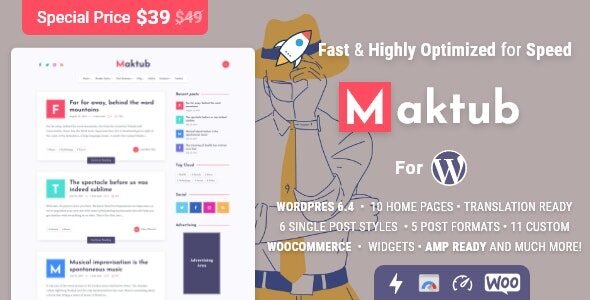
In an era where most WordPress themes ship bloated with page builders, animation libraries, dozens of demo layouts, and hundreds of options nobody uses, Maktub takes a deliberately different approach. It’s lean, purposeful, and uncompromisingly fast — a blog theme built from the ground up for one thing: making your words look exceptional and load instantly.
Maktub 2.0.6 by EstudioPatagon is the latest release of this popular minimalist blog theme for WordPress, and it continues the theme’s long-standing commitment to speed, typography, and lightweight code. Capable of achieving up to 100% scores on Google PageSpeed Insights for desktop, Maktub is one of the few premium WordPress themes that can genuinely make that claim without asterisks.
Whether you’re a personal blogger, travel writer, journalist, tech writer, or content creator who wants a distraction-free publishing environment that doesn’t compromise on performance, this guide covers everything you need to know about Maktub 2.0.6 — what’s new, the complete feature set, who it’s for, pricing, and where to download it.
What Is Maktub?
Clean, Fast, Minimalist, and lightweight. Maktub is a super modern Blog highly focused on Speed and Typography. This text-centric theme includes one unique mode, “text-mode” which can dramatically increase the rendering time of your website.
Developed by EstudioPatagon — a reputable ThemeForest author focused exclusively on lightweight, performance-first WordPress themes — Maktub is sold on ThemeForest and has maintained a loyal following among bloggers and content creators who prioritize content over visual clutter.
This theme fits perfectly with any kind of blog, especially personal, travel, technology, or biography blogs. It is super light, requiring just 1 required plugin for all features. This fast theme was made with multiple techniques to achieve excellent scores on Google Insights, also keeping in mind the code quality and SEO. It is easy to use and customize, and includes 11 custom widgets and a powerful Theme Options Panel to make easier the administration.
The name “Maktub” comes from Arabic, meaning “it is written” — a fitting name for a theme designed to make written content the undisputed star of the show.
What’s New in Maktub 2.0.6?
Version 2.0.6 was released on November 23, 2025. The update includes a fix for incorrect alignment for Lists in the Gutenberg Editor, improved sticky header position for logged-in users, improved compatibility with Prepros 7 and the latest Dart version, improved recommended plugins, fully tested compatibility with WordPress v6.8 and greater, and a new option to disable pagination on Post Lists Modules used in custom homepages.
These are targeted, practical improvements that reflect EstudioPatagon’s quality-over-quantity update philosophy. The Gutenberg list alignment fix resolves a visual inconsistency that could affect the presentation of structured content in the block editor. The sticky header improvement specifically addresses a logged-in user scenario — important for bloggers who frequently preview their own content while logged into WordPress. And the new pagination disable option for Posts Lists Modules gives much more granular control over custom homepage layouts.
Maktub 2.0.5 — The Previous Major Update (November 13, 2024)
Version 2.0.5 fixed several PHP 8.x deprecations on the back-end, fixed a PHP warning that occurred when migrating from another EstudioPatagon theme, improved multiple translations including Spanish, French, and Turkish, updated the admin framework to make it compatible with PHP v8.x, improved the Welcome page URLs, improved Wizard PHP compatibility up to v8.x, made several accessibility and SEO improvements, improved WooCommerce compatibility up to v9.x, and improved the PrePros 7 configuration.
The PHP 8.x compatibility work in 2.0.5 was a foundational update — ensuring Maktub works flawlessly on modern PHP environments, which is now the baseline expectation for any actively maintained WordPress theme.
Earlier Version Highlights
Earlier updates added WooCommerce compatibility up to version 8.2.2, breadcrumbs compatibility with Yoast, NavXT, and Rank Math plugins, an option to remove headings from excerpts, compatibility with PHP 8.2.4, and compatibility with WordPress 6.4. They also fixed the Telegram icon always being visible in the social widget area, fixed a post format Gallery issue on AMP mode, fixed MutationObserver and CLS warnings from Google Insights, and improved accessibility and best practices based on Google Insights tests.
The Complete Maktub Feature Set
1. The Signature Text Mode — Maximum Speed, Minimum Distraction
The single most distinctive feature in Maktub is its Text Mode — a unique display option that has no direct equivalent in any other premium WordPress theme.
This text-centric theme includes one unique mode, “text-mod,e” which can dramatically increase the rendering time of your website. Also, this theme fits perfectly with any kind of blog specially personal, travel, technology, or biography blogs.
When Text Mode is enabled, Maktub strips the theme down to its essential typographic elements — removing featured images, decorative elements, and visual chrome from listing pages and focusing the visitor’s attention entirely on headlines, excerpts, and written content. The result is an ultra-fast, newspaper-like reading environment that loads near-instantly and keeps the reader focused on your words.
Text Mode is toggleable from the Theme Options Panel, making it easy to switch between a more visual presentation and a pure text-based layout depending on your editorial needs. Blogs that publish opinion pieces, long-form essays, and thought leadership content benefit most from this mode.
2. Exceptional Performance — Up to 100% Google PageSpeed
This Theme is capable of getting high scores on Google Insights (up to 100%) for Desktop.
Achieving a 100% Google PageSpeed score is a benchmark that the vast majority of WordPress themes — including many that market themselves as “fast” — cannot hit out of the box. Maktub reaches this benchmark through a combination of deliberate architectural choices:
The theme is highly optimized and lightweight (just 1MB size), is PHP 8 ready for faster rendering time, features minified and optimized code, and is built with SCSS and pre-compiled with Prepros 7 (Windows and Mac compatible).
Additional performance features include:
Lazy Load for Lists (home pages, archives, categories, etc.), Lazy Load for post content, and Lazy Load for embed (iframes like YouTube, Vimeo, and SoundCloud).
Lazy loading means images and embedded media only load as they scroll into the visitor’s viewport — a significant reduction in initial page weight and a meaningful improvement to both perceived load time and Core Web Vitals scores.
Using shared hosting? Maktub has a very low INODES usage. INODES (the number of individual files on a server) is a real limitation on shared hosting plans. Many premium themes balloon their INODE count with hundreds of template files, font files, and image assets. Maktub’s 1MB footprint and minimal file structure keep INODES low — making it an excellent choice for budget-conscious bloggers on shared hosting plans.
3. AMP Support — Transitional Mode
AMP Support (Transitional Mode) covers home, archives, author, and single post pages.
AMP (Accelerated Mobile Pages) support in Transitional Mode means your blog pages serve AMP-compatible versions to mobile visitors accessing your content through Google Search — delivering near-instant loading on mobile devices with slow connections.
Maktub’s AMP implementation is thoughtfully optimized: the sidebar and footer widgets are automatically removed on AMP pages to reduce CSS usage that isn’t needed for mobile users. The post format Gallery issue on AMP was also fixed in a recent update.
4. Multiple Homepage & Layout Options
Maktub offers enough layout variety to serve very different blogging styles without becoming overcomplicated:
Layout options include Fullwidth with Sidebar, Fullwidth no Sidebar, Classic with Sidebar, and Classic no Sidebar. Additional options include No Sidebar Style for Post and Pages, Custom Tag page, and Custom Author page.
Homepage layouts are built with Posts Lists Modules — modular content blocks that can be combined to build a custom homepage. Version 2.0.6 adds the ability to disable pagination on these modules, giving you more control over how content is presented on custom homepage layouts — for example, showing a fixed set of featured articles without a paginated footer.
The combination of layout flexibility with the minimal aesthetic means Maktub can accommodate everything from a simple chronological feed to a curated magazine-style homepage, while never losing the clean, lightweight feel that defines the theme.
5. 11 Custom Widgets
Maktub includes 11 custom widgets and a powerful Theme Options Panel to make administration easier.
These purpose-built widgets are designed specifically for blog content presentation and go well beyond WordPress’s default widget set. They include:
- Recent Posts Widget — Display recent posts with featured images and post metadata
- Popular Posts Widget — Show most-viewed posts, with an Order by Post Views option added in a previous update
- Category Carousel Widget — Visually showcase categories in a carousel layout
- Social Icons Widget — Display links to all major social networks with clean icon styling
- About / Author Widget — Introduce yourself to readers with an author bio block in the sidebar
- Advertising Widget — Display ad banners in the sidebar with clean formatting
- Tags Cloud Widget — Show your most-used tags in a compact cloud format
- Newsletter Widget — Collect email subscribers directly from the sidebar
The Order by Post Views option added to the Post with Thumbnails Widget lets you highlight your most popular content automatically — a powerful tool for keeping new visitors engaged with your best-performing posts.
6. Comprehensive Advertising System
Maktub treats advertising as a first-class feature rather than an afterthought:
A dedicated advertising section is included below the header, before and after the post content, and a custom advertising section to place anywhere. An advertising section between grid posts is also available.
This covers every standard ad placement used in professional blog monetization:
- Below header — High-visibility leaderboard placement that loads before content
- Before post content — Pre-content placement that captures readers before they start reading
- After post content — Post-content placement targeting readers who’ve finished an article
- Custom advertising — Placeable anywhere using the Theme Options Panel
- Between grid posts — In-feed advertising that appears naturally within post listing pages
All ad placements accept standard ad code from networks including Google AdSense, Mediavine, AdThrive, or any custom HTML ad code. This makes Maktub genuinely suitable for bloggers who monetize through display advertising.
7. SEO-Ready Architecture
Open Graph Support is built in, and the theme was made with multiple techniques to achieve excellent scores on Google Insights while keeping code quality and SEO in mind.
Breadcrumbs are compatible with Yoast SEO, NavXT, and Rank Math plugins.
SEO features include:
- Open Graph metadata — Ensures your posts display properly when shared on social media platforms, with a correct title, description, and featured image previews
- Yoast SEO, Rank Math & NavXT breadcrumb compatibility — Works seamlessly with the leading WordPress SEO plugins
- Clean, semantic HTML5 markup — Proper heading hierarchy, article tags, and structured markup
- Fast load times — Speed itself is one of Google’s confirmed ranking factors, and Maktub’s performance advantage translates directly into SEO benefit
- CLS warnings fixed — A previous update specifically addressed MutationObserver and Cumulative Layout Shift (CLS) warnings from Google Insights — a Core Web Vitals metric
8. Sticky Sidebar & Header
Maktub includes a sticky sidebar that follows the user as they scroll — keeping your widgets (about section, newsletter form, ads) visible throughout the reading experience without requiring the reader to scroll back up.
The sticky header has been improved specifically for logged-in users in version 2.0.6, ensuring correct positioning of the header when the WordPress admin bar is visible. This is a common pain point on themes with sticky headers and an important refinement for bloggers who frequently view their own site while logged in.
9. Lightbox & Media Support
Maktub includes a built-in Lightbox for post images — clicking any image in a post opens it in a full-screen overlay without navigating away from the article. The Lightbox is compatible with both standard image galleries and the post format Gallery type.
Lazy Load for embed (iframes like YouTube, Vimeo, and SoundCloud) is built in, meaning video embeds in posts don’t block page rendering. Videos load only when they scroll into view, preserving the theme’s exceptional PageSpeed scores even on media-rich posts.
10. Post Views Counter
Maktub includes a built-in post views counter that tracks how many times each article has been read. This powers the “Order by Post Views” functionality in the Post with Thumbnails Widget, allowing you to automatically surface your most popular content in the sidebar. The view counter has been refined over multiple updates to ensure accuracy for posts created before Maktub was installed.
11. Dropcap & Typography Controls
As a typography-first theme, Maktub includes fine-grained control over how text is presented:
- Dropcap support — The first letter of a post’s first paragraph can be displayed as a large decorative dropcap, styled using your chosen custom title font family (a bug with this in earlier versions was fixed)
- Custom font family — Set custom fonts for titles and body text from the Theme Options Panel
- Heading hierarchy controls — Manage how headings display across the site
- Remove headings from excerpts — An option to strip heading tags from post excerpts in listing pages for cleaner presentation
12. Gutenberg / Block Editor Compatible
Maktub fully supports the WordPress block editor (Gutenberg), with custom admin styles applied to the editor to match the frontend appearance. Version 2.0.6 specifically fixes the incorrect alignment for Lists in the Gutenberg Editor, ensuring that bulleted and numbered lists in your posts display consistently between the editor and the frontend.
A previous update also ensured custom Gutenberg admin styles from Theme Options → Advanced Settings work correctly — so your editor experience reflects your frontend design choices.
13. WooCommerce Compatible
Maktub has improved WooCommerce compatibility up to v9.x.
While Maktub is primarily a blogging theme, WooCommerce compatibility means bloggers can add a simple shop to sell digital products, merchandise, e-books, or courses without needing a separate e-commerce theme. WooCommerce pages are styled to match the minimal aesthetic of the rest of the site.
14. Translation Ready — 4 Languages Included
Maktub is fully compatible with AMP in Transitional Mode, and it is multilingual, including English, Spanish, French, and Turkish.
Four language translations ship with the theme — English, Spanish, French, and Turkish — with recent updates improving the Spanish, French, and Turkish translation files. The theme is fully translation-ready using standard WordPress. .po/.mo file format, meaning it can be translated into any language using tools like Loco Translate or WPML’s string translation.
15. Social Media Integration
Maktub includes comprehensive social media integration:
- Social sharing buttons on single post pages for major networks
- Social Icons Widget with icons for all major platforms
- A previous update updated the Twitter/X icon to the current “X” branding
- A fix for the Telegram icon always being visible in the social widget area (now only shows when a Telegram profile URL is set)
16. Autoplay Slider & Custom Homepage Modules
A previous update added an Autoplay option to the Slider Module — giving custom homepage layouts the ability to cycle automatically through featured posts. Combined with the new pagination disable option added in 2.0.6, Maktub’s custom homepage builder is genuinely flexible for different editorial approaches.
17. Last Updated / Modified Date on Single Posts
A previous update added a Last Updated/Modified Date option to single posts (available at Theme Options → Blog → Single Post). Showing when content was last updated is a transparency signal that readers and search engines both value — it tells Google your content is fresh and tells readers the information is current. For bloggers who regularly update older posts with new information, this is an important SEO and trust-building feature.
Layout Demos — What Maktub Looks Like
Maktub’s minimalist design philosophy means a consistent visual language across all layouts. The theme ships with several pre-configured demo layouts that cover the full range of use cases:
Classic Blog — A traditional chronological post feed with featured images, post titles, excerpts, and metadata. Clean, readable, and classic.
Text Mode Blog — The signature Maktub mode: a pure text feed showing only post titles, dates, categories, and short excerpts. Zero images, maximum speed.
Magazine Homepage — A modular custom homepage combining a Slider Module for featured posts, a grid of recent articles, a category carousel, and sidebar widgets.
Fullwidth No Sidebar — A wide, immersive reading experience ideal for long-form content without sidebar distractions.
Fullwidth with Sidebar — The classic blog layout with a persistent sidebar for widgets, ads, and navigation.
Who Is Maktub 2.0.6 Perfect For?
Maktub is ideal for personal bloggers and content creators, writers, storytellers, and journalists, minimalist lifestyle and travel blogs, tech, food, fashion, and niche bloggers, SEO-conscious bloggers wanting a lightweight site, and anyone seeking a fast, distraction-free blogging platform. If your goal is to publish content in a clean, elegant, and fast environment, Maktub is built for you.
More specifically, Maktub excels in:
Speed-Obsessed Bloggers — If your existing theme is dragging your PageSpeed scores below 90, Maktub’s sub-1MB footprint and optimized code can restore you to the green zone — and potentially hit 100% on desktop.
SEO-Focused Content Creators — Fast load times, clean semantic markup, Yoast/Rank Math breadcrumb integration, Open Graph support, and CLS fixes all combine to give Maktub a genuine SEO advantage over heavier themes.
Shared Hosting Users — The very low INODES usage makes Maktub one of the most shared-hosting-friendly premium themes available. You won’t hit INODE’s limits or see degraded admin performance.
Monetizing Bloggers — The dedicated advertising section covering all standard placements (header, pre-content, post-content, in-feed) makes Maktub a capable platform for display ad monetization without any additional plugin configuration.
Minimalist Design Advocates — If you believe that a blog’s job is to present content, not distract from it, Maktub’s design philosophy aligns perfectly with that worldview.
Maktub vs. Heavy Blogging Themes
| Feature | Maktub 2.0.6 | Heavy Blog Theme |
|---|---|---|
| Theme Size | 1MB | 10–50MB+ |
| Required Plugins | 1 | 5–15+ |
| Google PageSpeed (Desktop) | Up to 100% | 60–85% typical |
| Text Mode | ✅ Unique feature | ❌ |
| AMP Support | ✅ Transitional Mode | Varies |
| INODES Usage | ✅ Very low | High |
| PHP 8.x Compatible | ✅ | Varies |
| Gutenberg Compatible | ✅ | Varies |
| WooCommerce Compatible | ✅ v9.x | Varies |
| Lazy Load (Images + Embeds) | ✅ Built-in | Plugin required |
| Built-in Advertising Sections | ✅ 4 placements | Plugin required |
| Built-in Post Views Counter | ✅ | Plugin required |
| Translation Languages Included | 4 (EN/ES/FR/TR) | Varies |
| Pricing | ~$39 | $39–$79+ |
System Requirements
Maktub 2.0.6 is designed for modern WordPress environments:
- WordPress: 6.8 or higher (fully tested in v2.0.6)
- PHP: 8.x (fully compatible and optimized for PHP 8.x performance gains)
- Required Plugins: Just 1 (EstudioPatagon’s companion plugin for full feature access)
- Compatible Browsers: Chrome, Firefox, Safari, Edge (modern versions)
- Compatible Plugins: WooCommerce (up to v9.x), Yoast SEO, Rank Math, NavXT, WPML, Loco Translate
Maktub Pricing
Maktub WordPress theme is available on ThemeForest for approximately $39–$59 (subject to change). The license includes lifetime theme updates and access to demo content, theme features, and full documentation. For bloggers focused on speed, readability, and SEO, this theme offers excellent value.
The one-time purchase price includes:
- Full theme files
- All future version updates (lifetime)
- Access to EstudioPatagon’s direct support system via ticket
- Complete theme documentation
- 6 months of author support (extendable to 12 months at checkout)
EstudioPatagon offers direct support via their dedicated ticket system at estudiopatagon.ticksy.com, and are known for being responsive and helpful with technical questions.
How to Install Maktub
Getting Maktub set up is straightforward:
- Purchase Maktub from ThemeForest and download the theme package from your account’s Downloads tab.
- In your WordPress admin, navigate to Appearance → Themes → Add New → Upload Theme.
- Upload the
maktub.zipfile, click Install Now, then Activate. - The theme will prompt you to install the required companion plugin. Install and activate it.
- Navigate to the EstudioPatagon Setup Wizard that appears after activation — it guides you through importing demo content, setting up pages, and configuring basic options.
- Customize your blog from Appearance → Customize or the dedicated Theme Options panel — set your logo, fonts, colors, homepage layout, and advertising sections.
- Enable or disable Text Mode from the Theme Options Panel based on your preferred aesthetic.
EstudioPatagon provides comprehensive documentation covering every feature and configuration option, with a straightforward installation wizard that makes the setup process accessible even for first-time WordPress users
Download Maktub WordPress Theme
Note: If you are having trouble with Maktub – Minimal & Lightweight Blog for WordPress Free Download Latest Version, try to disable AD blocking for the site or try another Web Browser. If disabling the AD blocker or changing the web browser does not help you, please contact us.
Final Verdict: Is Maktub 2.0.6 Worth It?
Without question — for the right blogger. Maktub 2.0.6 is exactly what it claims to be: a clean, fast, minimal.A list WordPress blog theme with a genuine focus on speed and typography that delivers results most other themes simply cannot match.
The 2.0.6 update continues the theme’s tradition of targeted, meaningful refinements: fixing Gutenberg list alignment, improving sticky header behavior for logged-in users, adding granular pagination control for custom homepage modules, and ensuring full compatibility with WordPress 6.8. None of these are flashy additions — all of them make Maktub a slightly more polished, more reliable daily tool for bloggers.
The theme’s unique Text Mode, 100% Google PageSpeed capability, built-in AMP support, comprehensive advertising system, and ultra-low INODES footprint combine to make Maktub a genuinely differentiated product in a market saturated with visually heavy, feature-bloated blog themes.
For bloggers focused on speed, readability, and SEO, Maktub offers excellent value. If that description sounds like you — and if you’ve been frustrated by themes that promise speed but deliver bloat — Maktub 2.0.6 is the blog theme you’ve been looking for.